May was a busy month for us, focused on three themes: bringing the day-to-day expert workflow into a single Home tab, broadening what your agent can actually do when answering a question, and a better embedded agent. Along the way, we also made the app noticeably lighter and faster to load. Here's what landed.
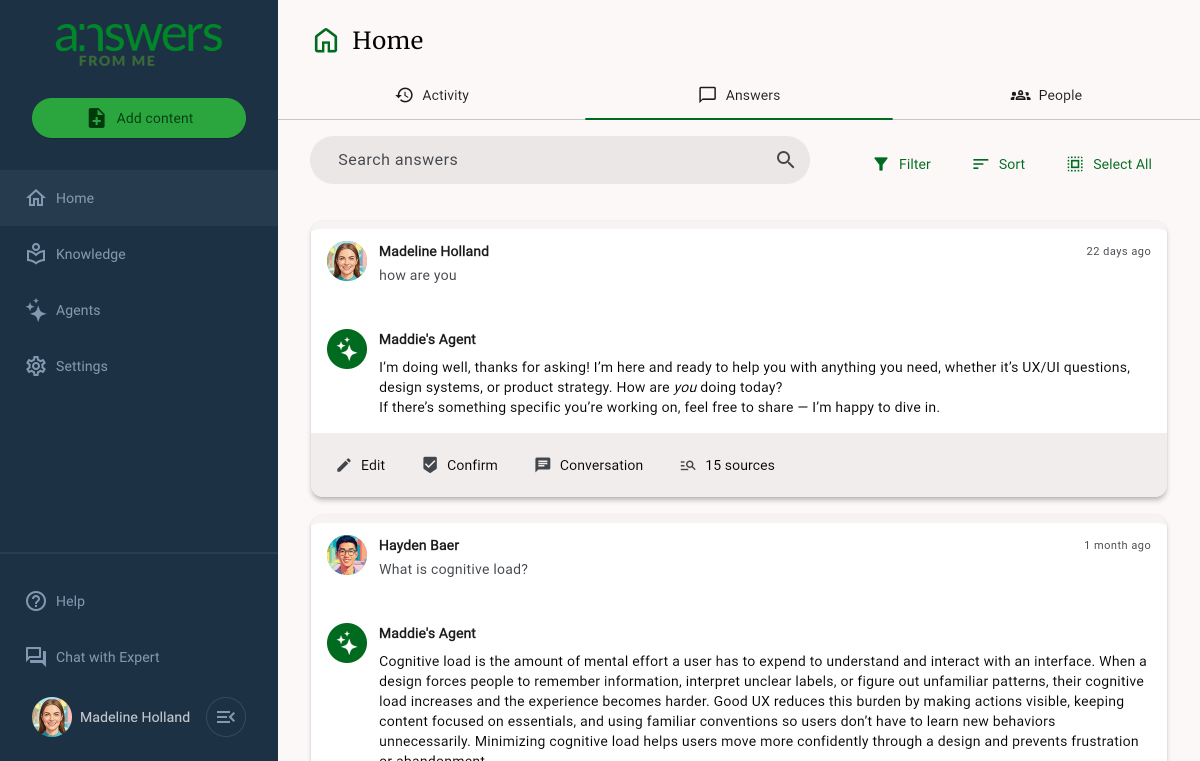
Home section with Activity, Answers and People
Activity, Answers, and People now live as tabs inside Home, so the things you look at every day are on the default Dashboard page.
- The Answers tab is built around a revamped Answer Card that shows the seeker, their question, your Agent's reply, and the actions you reach for most — Edit, Confirm, open the Conversation, and inspect the sources cited.
- Multi-select, filter, sort, and a Search answers remain on the Answers tab, with sort and filter preferences that stick.
- People lives next to Answers so you can jump between an answer and the seeker who asked it.
(Experimental) Tool use: smarter answering with web and knowledge base search and fetch
Improvements in the AI stack we use now make it possible to let the agent take more control over how it answers questions.
Your expert knowledge base is always the source of truth for your agent, but sometimes seekers ask questions that require multiple steps to answer, or external or up to the moment information. Instead of relying only on a single search of your knowledge base per answer, the agent can decide to pull in fresh context from the open web, fetch a specific page, or re-query your knowledge base in a different way — all while signaling to the user what's it's doing.
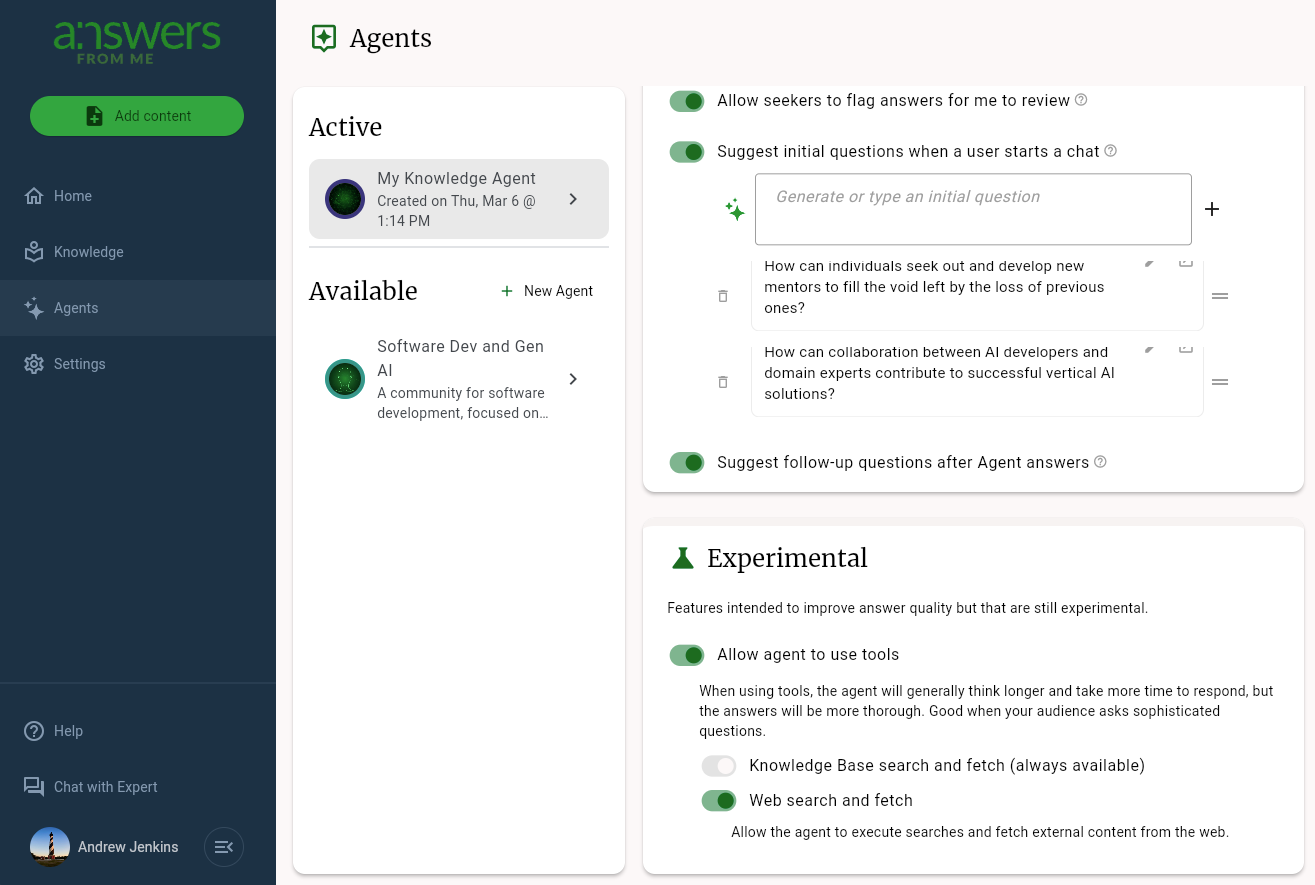
- Web search and fetch allows the agent to search the web information when the knowledge base doesn't cover what was asked.
- Knowledge base search and fetch can now be invoked multiple times in a single answer, so a more nuanced question gets researched more carefully.
- A streamed activity message appears in each in-progress answer so you can watch which sources the Agent is considering, before it replied — useful both for trust and for spotting answers worth editing.
- A handful of related answer-quality fixes shipped alongside this — most notably, confirmed answers are now more likely to be used as the basis for new answers, even if there is overlapping knowledge base content.
To try out this experimental feature, go to Agents, select your agent, and then scroll to the bottom of the settings area. There you'll find a setting to enable or disable the new tool use feature.
A new look for the Embedded Agent
Many of our experts want to embed their Answers From Me agent into their existing web properties (websites, blogs, etc.). We are phasing out our original embedded agent for one that is based on the same UX as the Expert Page agent. It's a drop in replacement for the original, and will take just a minute for you to set up.
- Embed capability now including host-side controls
to show or hide the expand button and an
expandable=trueparameter for sites that want to opt in explicitly. - Hand-off from the Seeker App to the main app preserves context, so a visitor who wants the full experience doesn't lose their place.
- Mobile virtual-keyboard handling was fixed on the Seeker App and the same fix was extended to the Expert Page; long messages now wrap and scroll up to 12 lines without resizing the chat.
- A new help article walks through embedding your Agent, including advanced styling.
Learn more about embedding your Agent
Other noteworthy improvements
- Lighter, faster app A focused effort on the app download size and startup path cut bundle weight and shortened time-to-first-interaction.
- A Claim Your Referral button on the subscribed-expert card makes it easier to claim the referral program we introduced in April.
- Improved mobile experience, including better answer review and better scrolling of items cited
- (Behind the scenes) We rolled out an agentic on-call workflow: production alerts route to an agent that triages the issue, opens a ticket if needed, and in many cases proposes the fix. Combined with better cloud-log query ergonomics and tighter alert routing, this is letting us catch and resolve issues before they reach you.
As always, we'd love to hear how the new Home tab and the smarter answering land for you — share your feedback with our CEO Scott's agent at https://answersfrom.me/scott.
Cheers,
The Answers From Me Team
Was this article helpful?
That’s Great!
Thank you for your feedback
Sorry! We couldn't be helpful
Thank you for your feedback
Feedback sent
We appreciate your effort and will try to fix the article