Answers From Me offers an Open Responses-compatible API so developers can interact with an Expert's Knowledge Agent from their own applications, using the same request and response shapes as modern LLM APIs.
Any developer can send a question to an Expert's Knowledge Agent over a simple HTTP API, using a secret key tied to the Expert's Knowledge Hub. As the Expert adds content, curates answers, and tunes their Agent, those changes are reflected in the API responses.
The API follows the Open Responses specification — an open standard based on OpenAI's Responses API. Because the surface is standard, you can use existing Responses-compatible client libraries by pointing them at the AFM base URL:
https://api.answersfrom.me
Capabilities
- Create a response to a question, either as a one-shot request or as part of an ongoing conversation.
- Continue a conversation in one of two ways: pass
previous_response_idto chain standalone responses, or attach requests to a conversation that is fully visible in your Expert Dashboard. - Stream responses as Server-Sent Events by setting
"stream": true. - Address multiple Experts with a single key by selecting a different Agent via the
modelparameter (see below). - Knowledge-base search via the built-in
afm.kb_searchtool, which routes the request to the Agent's agentic knowledge task. - List the Agents a key can reach with
GET /responses/v1/models.
Please note that this API is in beta and may change as we receive user feedback.
The Specification
The full Open Responses specification is published at https://www.openresponses.org/. AFM exposes the standard endpoints under the /responses/v1/ path prefix, for example:
POST https://api.answersfrom.me/responses/v1/responses
A small number of AFM-specific additions (such as the afm.kb_search tool) extend the standard without changing its shape.
Creating an API Key
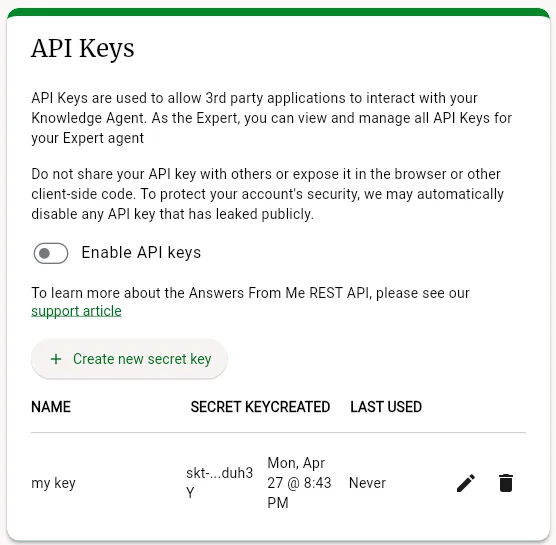
To create an API Key, sign in to the app, click Settings in the left navigation of your Expert Dashboard, click the Connect tab, and scroll to the API Keys card. Turn on Enable API keys, then select the Create new secret key button. API keys are part of the Basic plan and higher; see Plans, Usage and Limits. The secret key will only be presented once, so make sure to copy it and put it in a safe place. You can create as many keys as you want for different applications, and delete a key if it is no longer used.
Making Your Agent Accessible to Other API Keys
By default, your API key can reach your own Agent. If you want other developers — using their API keys — to be able to send questions to your Agent, enable this on the Connect tab in the API Access card, located just below the API Keys card.
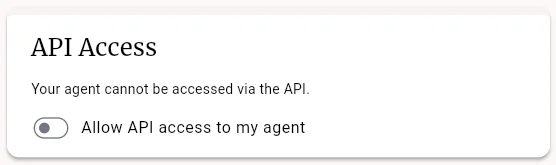
- Allow API access to my agent — the master switch. When off, only you (the Expert, using your own key) can reach your Agent via the API.
- Allow access to — choose who else may reach your Agent:
- only me — restricted to the Expert.
- my subscribers — the Expert and existing subscribers (seekers).
- anyone — any API user.
- Auto-subscribe API users to my agent — when on, an API user who is not yet a subscriber is automatically subscribed the first time they reach your Agent. When off, only existing subscribers are allowed.
Changes take effect immediately.
Using the API Key
Authentication requires an API Key. The key must be passed as a Bearer token in the Authorization header:
Authorization: Bearer (your secret key)
The model Parameter
The model parameter selects which Expert's Agent answers the request:
afm/me— your own Agent (the Agent associated with the API key).afm/<handle>— another Expert's Agent, addressed by their handle. For example,afm/scottreaches the Agent for the Expert with handlescott. Access is subject to that Expert's API Access settings described above.afm/<handle>/<agent>— a specific named Agent within an Expert's Hub, when the Expert publishes more than one.
Call GET /responses/v1/models with your key to list the Agents it can currently address.
Example Request
curl https://api.answersfrom.me/responses/v1/responses \
  -H "Authorization: Bearer $AFM_API_KEY" \
  -H "Content-Type: application/json" \
  -d '{
    "model": "afm/me",
    "input": "What topics can you answer questions about?"
  }'
The response is a standard Open Responses object containing the Agent's reply in its output. Responses generally take from 5 to 15 seconds, but can take longer if the Expert's Agent is complex.
Continuing a Conversation
To ask a follow-up that remembers the previous exchange, pass the id from the prior response as previous_response_id:
curl https://api.answersfrom.me/responses/v1/responses \
  -H "Authorization: Bearer $AFM_API_KEY" \
  -H "Content-Type: application/json" \
  -d '{
    "model": "afm/me",
    "input": "Can you go into more detail on the first one?",
    "previous_response_id": "resp_..."
  }'
Streaming
Set "stream": true to receive the reply as it is generated, as Server-Sent Events:
curl -N https://api.answersfrom.me/responses/v1/responses \
  -H "Authorization: Bearer $AFM_API_KEY" \
  -H "Content-Type: application/json" \
  -d '{
    "model": "afm/me",
    "input": "What topics can you answer questions about?",
    "stream": true
  }'
Testing Your API Key
The Open Responses project provides a public acceptance-test page at https://www.openresponses.org/compliance. Enter your AFM base URL (https://api.answersfrom.me/responses/v1), your secret key, and a model such as afm/me to exercise the API against the standard test suite and see sample responses.
Was this article helpful?
That’s Great!
Thank you for your feedback
Sorry! We couldn't be helpful
Thank you for your feedback
Feedback sent
We appreciate your effort and will try to fix the article